
DevSecOps Process Documentation – New Security Operating Model
Executive Summary
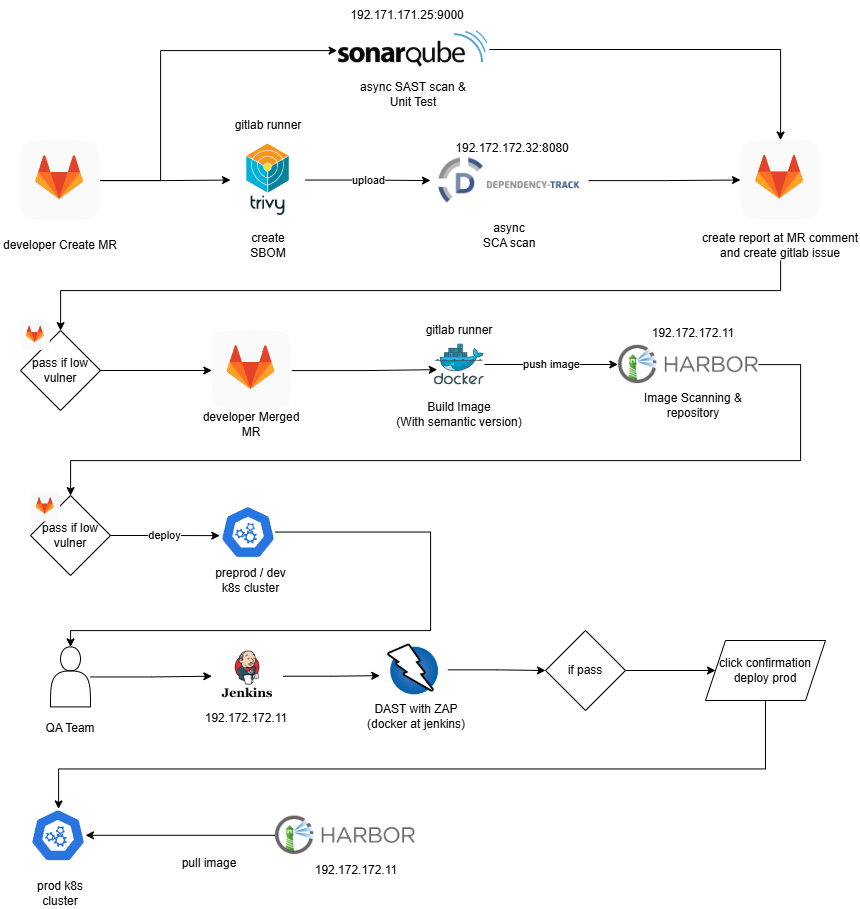
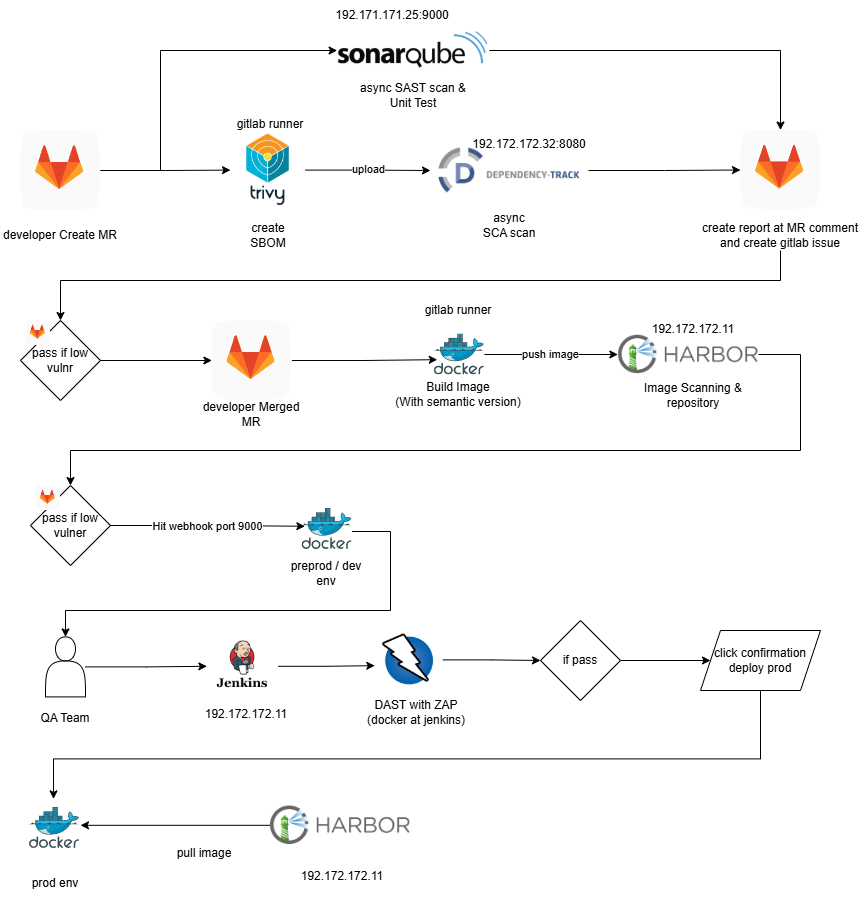
This document provides a comprehensive explanation of the new DevSecOps operating model illustrated in the first architecture diagram. The design intentionally shifts from a traditional enforcement-driven pipeline toward a maturity-driven security culture model.
The primary objective is not merely to insert more security tools into CI/CD, but to:
- Establish secure development habits
- Reduce friction caused by false positives
- Increase transparency and visibility of risk
- Gradually introduce enforceable quality gates
- Ensure production-grade security without disrupting developer velocity
This document explains:
- Strategic vision and philosophy
- Detailed end-to-end technical workflow
- Tooling integration architecture
- Maturity roadmap and phased enforcement strategy
- Governance and operational considerations
- Risk management improvements
- Comparison with the previous DevSecOps model
1. Strategic Philosophy Behind the New Model
1.1 From Enforcement-First to Culture-First
Traditional DevSecOps implementations often introduce immediate CI/CD blockers. While technically correct, this frequently results in:
- Developer frustration
- Workarounds and suppression abuse
- Ignored dashboards
- Reduced trust in security tooling
The new model adopts a different philosophy:
Build awareness first, enforce later.
We begin with:
- Visibility
- Reporting
- Transparency
- Measurement
Then we gradually transition toward:
- Policy enforcement
- Quality gates
- Merge blocking
-
Deployment blocking
1.2 Shift-Left + Shift-Right Security
The model implements security at multiple layers:
| Phase | Security Layer |
|---|---|
| Code Phase | SAST + Credential Scanning |
| Dependency Phase | SCA via SBOM |
| Build Phase | Container Image Scan |
| Runtime Phase | DAST |
| Governance Phase | Policy & Quality Gates |
This ensures defense in depth across the SDLC.
2. End-to-End Workflow (Detailed Technical Explanation)
for Kubernetes
for Docker
2.1 Stage 1 – Developer Creates Merge Request
This is the primary control point in the pipeline.
When a developer creates a Merge Request (MR) in GitLab:
2.1.1 SonarQube – SAST & Unit Test Analysis
SonarQube performs:
- Static Application Security Testing (SAST)
- Code Quality Analysis
- Unit Test Coverage Evaluation
- Credential/Secret Scanning
- Vulnerability severity categorization
- Technical debt analysis
Policies Configured in Sonar
- Minimum unit test coverage threshold
- Vulnerability severity threshold
- Code smell limit
- Credential detection rules enabled
- Security Hotspot tracking
At the early maturity phase:
- Sonar results are visible.
- Developers are expected to review findings.
- CI does not block MR.
Later (mature stage):
- Sonar Quality Gate will block MR if:
- Coverage below threshold
- High/Critical vulnerabilities detected
- Credential leakage found
- Security hotspot not reviewed
2.1.2 SBOM Generation – Trivy
During MR pipeline:
- Trivy generates SBOM (Software Bill of Materials).
- SBOM is uploaded to Dependency-Track.
Why SBOM matters:
- Full dependency visibility
- Compliance readiness
- Supply chain transparency
- CVE traceability
2.1.3 Dependency-Track – Asynchronous SCA
Dependency-Track performs:
- Vulnerability detection on libraries
- Transitive dependency analysis
- License compliance validation
- Risk scoring
- Portfolio risk tracking
Scan runs asynchronously.
Results:
- Posted as MR comment
- GitLab issue automatically created
- Risk tracked historically
Early stage:
- Informational only
- No merge blocking
Mature stage:
- MR blocked if:
- Critical CVEs exceed threshold
- Exploitable CVSS > defined limit
- License policy violation detected
2.2 Stage 2 – Merge Approved & Docker Image Build
Once MR is merged:
2.2.1 Docker Build
- Application container image built.
- Tagged with commit SHA/version.
2.2.2 Push to Harbor Registry
- Image pushed to Harbor.
2.2.3 Harbor Image Scanning
Harbor performs:
-
OS-level vulnerability scanning
- Package-level scanning
- CVE classification
- Severity categorization
This protects against:
- Base image vulnerabilities
- System-level exploits
- Library injection risks
Early stage:
- No blocking
- Developers notified.
Mature stage:
- Push rejected if:
- High/Critical vulnerabilities exceed limit.
2.3 Stage 3 – Pre-Production / Development Deployment (Kubernetes / Docker)
If vulnerability threshold acceptable:
- Image deployed to Pre-Prod/dev Kubernetes cluster / docker env.
- Environment mirrors production.
- Used for runtime validation.
2.4 Stage 4 – DAST with OWASP ZAP
Dynamic Application Security Testing is executed against the running application, ZAP must be manual trigger from jenkins with QA team to execute scanning.
ZAP scans for:
- SQL Injection
- XSS
- CSRF
- Broken Authentication
- Insecure headers
- Server misconfiguration
- Sensitive data exposure
Early stage:
- Informational.
- Report shared with team.
Mature stage:
-
Production deployment blocked if critical issues detected.
2.5 Stage 5 – Manual Approval & Production Deployment
After DAST pass:
- Manual confirmation required.
- Production cluster pulls image from Harbor.
- Deployment performed (recommended: Rolling Update).
3. Pros and Cons Comparison
Advantages of This Model
- Cultural Adoption Strategy ( Gradual Enforcement )
- SBOM-Based Governance ( Stronger supply chain control. )
- Centralized SCA (Dependency-Track) (Portfolio-level visibility.)
- Multi-Layer Defense (Static + Dependency + Container + Runtime.)
- False Positive Optimization Phase (Higher trust in tooling.)
- Gradual Enforcement
Disadvantages of New Model
- Requires Cultural Shift (Developers must actively review dashboards.)
- Requires Security Engineering Investment (Tools must be maintained.)